Arc Finders Getting Started
Get from installation to your first scan and your first post in under 15 minutes.
What is Arc Finders?
Arc Finders is a product launch system for Reddit. It helps you find conversations where your audience is already talking about the problem you solve, create posts that comply with each subreddit's rules, and engage authentically without spending hours on Reddit every day.
Everything runs in your browser. Your searches, scan results, and AI analysis are saved locally on your machine. The AI analysis runs through your own free Google Gemini account, so there are no usage caps and no per-scan costs.
Before You Start
Make sure you have these ready:
Google Chrome or a Chrome-based browser, like Dia, Comet etc browser installed
A Google account with access to Gemini at gemini.google.com. The free tier is fine.
An Arc Finders account. You will create this during onboarding.
Step 1. Install the Extension
Go to the Arc Finders listing on the Chrome Web Store or visit https://arcfinders.com
Click Add to Chrome
When prompted, click Add extension to confirm
Once installed, click the puzzle piece icon in your Chrome toolbar
Find Arc Finders and click the pin icon to keep it visible in your toolbar
You should now see the Arc Finders icon in your browser toolbar. Click it to open the extension.
Step 2. Create Your Account
Click the Arc Finders icon to open the extension
Click Create account
Enter your email address and choose a password
Check your inbox for a verification email and confirm your account
Log in to continue to onboarding
Note: Your account is used only for login. Your product data, searches, and scan results are stored locally on your machine and never sent to Arc Finders' servers.
Step 3. Connect Google Gemini
Arc Finders uses your own Google Gemini account to run all AI analysis. This is what allows you to scan and analyse as many posts as you want at no extra cost.
When prompted, click Open Gemini
Log in to Gemini with your Google account if you are not already logged in
Return to the Arc Finders extension
Click Verify connection
You should see a confirmation that your Gemini connection is live
If the verification fails, make sure you are logged into Gemini in the same Chrome browser window and try again.
Step 4. Describe Your Product
This is the most important setup step. The more specific you are here, the better every scan, reply suggestion, and post will be.
Fill in your product name
Describe what your product does in one to two sentences
Describe who it is for. Be specific about the type of person, not just a broad category.
Describe what problem it solves. Write this the way your users would describe the problem, not the way you would describe your solution.
Add any notes on what kinds of conversations you want to find
Example of a weak description:
A project management tool for teams.
Example of a strong description:
A lightweight task tracker for solo founders and indie hackers who find tools like Jira too complex. Solves the problem of spending more time managing the system than doing the actual work. Looking for conversations where people are frustrated with their current tools or looking for something simpler.
Step 5. Add Your Sources
Sources tell Arc Finders where to look. This is one of the things that makes Arc Finders different from keyword-only tools. You are not just entering search terms, you are pointing it at the exact corners of Reddit where your audience hangs out.
Add the subreddits most relevant to your product. For example, r/SideProject, r/indiehackers, r/webdev.
Add any Reddit search URLs you have already found useful. These are search result pages you can copy directly from your browser.
If you belong to any private communities relevant to your audience, add those too. Arc Finders can access any feed you can see in your browser.
How to find good subreddits:
Think about where your target users spend time on Reddit, not just where your product category lives
Use Reddit's own search to explore before adding. Look for communities that are active and have genuine discussions, not just self-promotion.
Start with 5 to 8 sources and expand from there
Once your sources are saved, you will see the Scan Now button. You are ready.
Step 6. Run Your First Scan
Your first scan does two things. It tests that everything is set up correctly, and it shows you what kinds of conversations are happening in your communities before you write a single post.
Click Scan Now
Arc Finders will open a Gemini tab and begin analysing posts. This takes a few minutes.
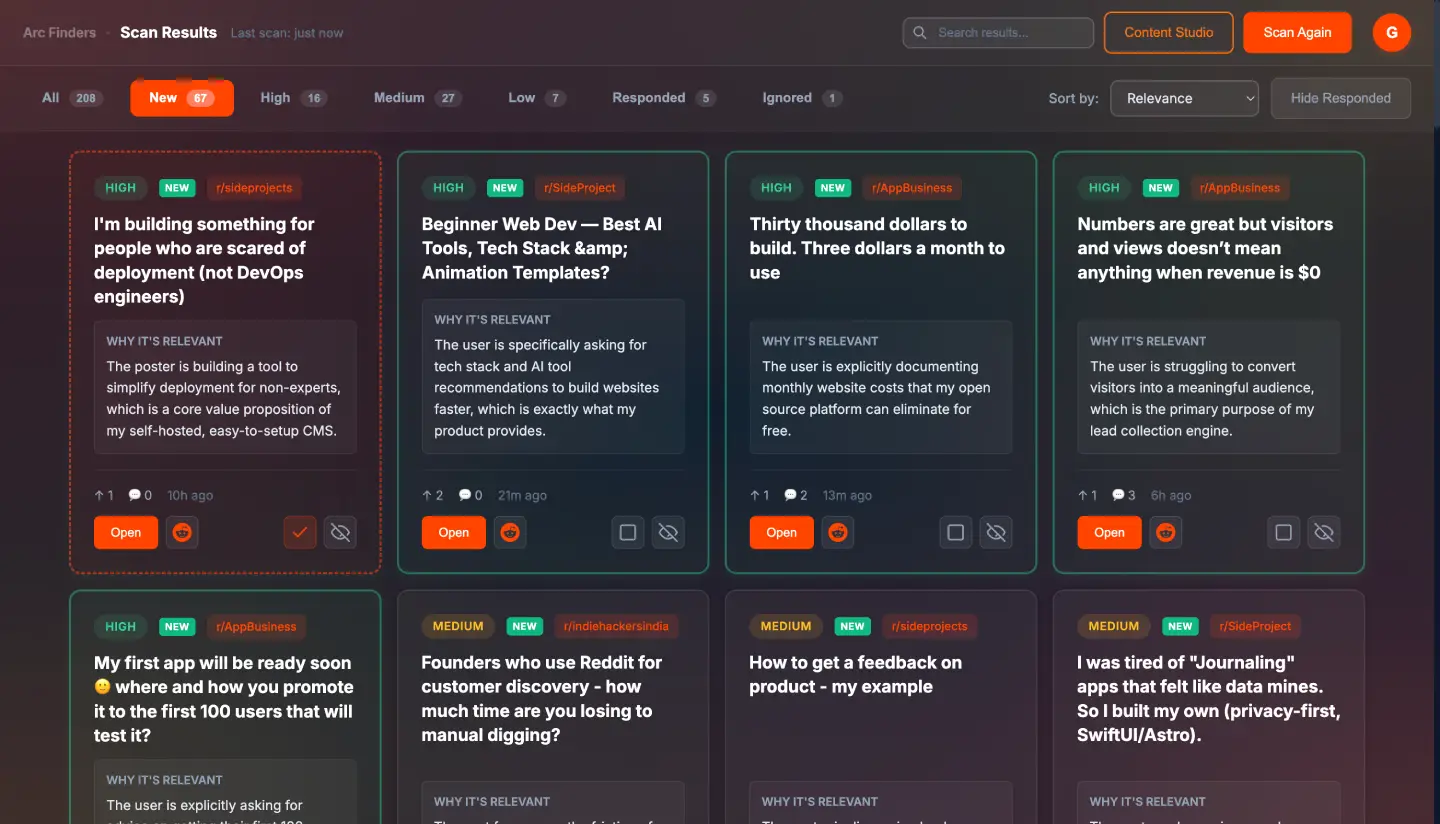
When the scan completes, you will see your results
Reading your results:
Each result has a relevance score and an explanation.
High. Someone is describing a problem your product directly addresses. Worth engaging with.
Medium. Related to your space but not a direct match. Worth a quick read to decide.
Low. Loosely related. Scan the reason and skip if it is not relevant.
Click into any result to see the full post, the AI's reasoning, the suggested engagement angle, and a draft reply.
To use a reply suggestion:
Read the full post in the detail view
Review the suggested reply
Edit it to add your own voice and any specific details you want to include
Click Copy and paste it directly into Reddit
Post it yourself. Arc Finders never posts on your behalf.
Step 7. Create Your First Post with Content Studio
Now that you have seen what your audience is talking about, you are ready to create your first launch post.
Click Content Studio in the extension
Select the subreddit you want to post in
Wait a moment. Arc Finders automatically loads the rules for that subreddit.
Describe what you want to share in this post. One sentence is enough to start, but the more context you give it, the better the output.
Click Generate. Arc Finders studies the top-performing posts in that subreddit and generates multiple post angles.
Reading your post options:
You will see three to four post angles, each with a different format and approach. Each one is also checked against the subreddit's rules.
Green badge. This post complies with that rule.
Yellow badge. Borderline. Review before posting.
Red badge. This post breaks that rule and needs to be fixed.
Pick the angle that fits best for this week. For the others, click Save Idea and they go into your drafts for future weeks.
When you are happy with a post:
Edit the draft directly in the text editor. It is a starting point, not a final version.
Check that all compliance badges are green
Review the posting tips panel for the best times to post in this subreddit
Click Ready to mark it as ready to publish
Copy it and paste it into Reddit yourself
Your 15-Minute Weekly Workflow
Arc Finders is designed to fit into the gaps in your day, not to take it over. Here is the habit that works.
Whenever you have 15 minutes:
Open Arc Finders and click Scan Now
While it runs, think about what you want to share this week
When results appear, review the High relevance posts first
Pick one or two worth engaging with and use the reply suggestions as a starting point
Once a week, open Content Studio and queue up your next post
That is the whole system. Scan. Post. Engage. Repeat.
Tips for Better Results
Write your product description like your user would describe their problem, not like a product manager would describe the solution. The AI scores posts against your description. If your description uses technical or marketing language, it will miss conversations where users describe the problem in plain terms.
Start with fewer sources and go deeper. Five well-chosen subreddits will give you better results than twenty loosely relevant ones. You can always add more later.
Correct the AI when it gets it wrong. If a High relevance result is clearly not relevant to you, use the thumbs down feedback. If a reply suggestion misses the point, add a correction and regenerate. The system improves with your input.
Edit every reply before you post it. The suggestions are starting points. Adding one specific detail from the post you are replying to, something that shows you actually read it, is the difference between a reply that gets upvoted and one that gets ignored.
Use the Content Studio to plan ahead. When Content Studio generates angles you do not use this week, save them as drafts. A pipeline of five or six ready-to-post ideas means you never face a blank page on posting day.
Troubleshooting
Gemini connection not verified. Make sure you are logged into Gemini at gemini.google.com in the same Chrome browser. Close and reopen the extension and try verifying again.
Scan returns very few results. Try expanding your sources. Add more subreddits or a broader Reddit search URL. Also check your product description to make sure it describes the problem clearly, not just the solution.
Post angles all have red compliance badges. This usually means the subreddit has strict no-self-promotion rules. Try a different angle type. Discussion starters and thought leadership posts tend to pass compliance checks more easily than direct product announcements in stricter communities.
Results feel irrelevant. Revisit your product description and make it more specific. You can also tweak your prompts in the Settings where you can provide specific instructions about what posts to ignore and what your writing style should be. The more clearly you describe who your user is and what problem they describe when they are looking for your solution, the more accurately the AI will score conversations.